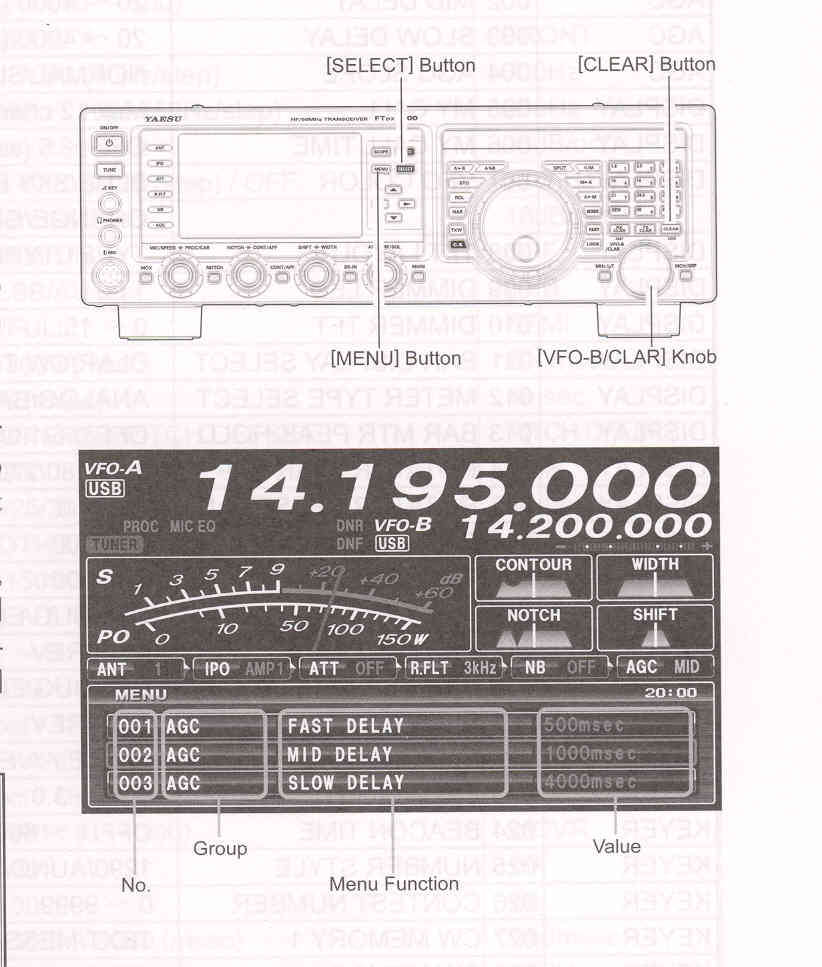
Using the Menu
1. Press the [MEMU] button to engage the Menu mode. The display will show the Menu Number, the Menu Group Name and the Menu Item.
2. Rotate the [VFO-B/CLAR] knob (or press the ▲ / ▼ button) to select the Menu item you wish to modify.
3. Press the [SELECT] button, then rotate the [VFO-B/CLAR] knob (or press the ▲ / ▼ button) to change the current setting of the selected Menu item.
ADVICE:
4. When you have finished making your adjustments, press the [SELECT] button, then press the [MENU] button to save the new setting and exit to normal operation. If you only momentarily press the [MENU] button, the new settings will not be retained.
Press the [CLEAR] button (located on the upper right of the [VFO-B/CLAR] knob) momentarily to reset the selected Menu item to the factory default value.
1. Turn the front panel [POWER] switch to off.
2. Press and hold in the [MENU] button, and while holding it in, press the [POWER] switch to turn the transceiver back on. Now release the [MENU] button.